index
Deploying Our Rails API with Kamal & GitHub Actions
This guide describes how we deploy the Rails API (jodapp-api) to QA and to production. The Board Web app (jodapp-web) uses the same flow with its own config; the differences are listed near the end.
The goals of this process are:
- Zero downtime
- Users do not notice a deploy. The old container keeps serving until the new one passes its health check.
- Consistency
- Every deploy follows the same automated steps.
- Safety
- Code is scanned and linted first. A deploy that fails its health check stops, and the old container keeps running.
- Flexibility
- Any engineer can deploy any branch to QA.
This page was last checked against the real config on 4 September 2026 (jodapp-api main at e54e58f8). The YAML blocks below are copies of the files in the repo. If they differ, the repo is right and this page needs an update.
The Big Picture: CI/CD Flow
Every deploy is started by hand from the Actions tab. There is no automatic deploy on push.
Core Concepts
Kamal
- A Ruby tool that turns our app into a Docker image and runs it on our servers.
- One
kamal deploydoes all of this: build the image, push it toghcr.io, pull it on the server, start the new container, wait for/up, switch traffic, stop the old container. - Config lives in
config/deploy.yml(production defaults) andconfig/deploy.qa.yml(QA overrides).
GitHub Actions
- Runs the workflow in
.github/workflows/ci.ymlwhen an engineer starts it by hand. - Job 1,
scan_and_lint, runs on a GitHub-hosted runner. - Job 2,
deploy_qaordeploy_production, runs on our own deploy runner.
Deploy Runner
- One persistent EC2 instance per environment:
jodapp.qa.deploy(runner groupjodapp-qa) andjodapp.prod.deploy(runner groupjodapp-prod). Ubuntu 24.04 on arm64. - Docker, Ruby and the
kamalgem are installed once. See Github Self-Hosted Runner for the setup steps. - The runner builds the image itself, and BuildKit keeps its layer cache on the runner's disk between runs. That cache is what makes a normal deploy fast. See "How Long a Deploy Takes" below.
Network Path
- The API servers sit in a private subnet. The deploy runner sits in the same VPC, so Kamal connects straight to the server's private IP over SSH, using the key at
~/.ssh/jodapp.<env>.deployon the runner.ssh.configisfalseinconfig/deploy.yml, so no~/.ssh/configand no ProxyJump is involved. - The HAProxy server in the public subnet still terminates SSL and forwards user traffic to
kamal-proxyon port 80 of the API server. It is not part of the deploy path. - User traffic reaches HAProxy through Cloudflare, which proxies both API hosts. Rails trusts Cloudflare's published ranges as proxies, so
request.remote_ipis the person's address and not a Cloudflare edge. See Identities D5, the row "The API sits behind Cloudflare". - The workflow still passes
BASTION_HOSTandKAMAL_SSH_KEY, and.kamal/secretslists them, but nothing reads them today. They are left over from an earlier setup that used the HAProxy server as an SSH bastion.
Step 1: Infrastructure & Security Groups
Before you begin, ensure the AWS infrastructure is set up correctly.
HAProxy Server: A single EC2 instance in a public subnet. It is the load balancer for user traffic.
Application Servers:
- One EC2 instance for production in a private subnet (
jodapp.prod.api) - One EC2 instance for QA in a private subnet (
jodapp.qa.api) - One deploy runner per environment in the same VPC (
jodapp.prod.deploy,jodapp.qa.deploy)
Security Groups:
haproxy-sg (for the HAProxy server):
- Inbound TCP/443: from 0.0.0.0/0 (public HTTPS traffic).
private-subnet-sg (for the API servers):
- Inbound TCP/80: from haproxy-sg (HAProxy forwards traffic to the app).
- Inbound TCP/22: from the deploy runner (Kamal runs Docker commands over SSH).
Step 2: SSH Key & GitHub Configuration
SSH key
Each deploy runner has its own SSH key pair, named after the instance: ~/.ssh/jodapp.qa.deploy on the QA runner and ~/.ssh/jodapp.prod.deploy on the production runner. The public key is added to ~/.ssh/authorized_keys of the ubuntu user on the matching API server. The steps are in Github Self-Hosted Runner.
GitHub secrets and variables
Set these per GitHub environment (qa and production) under Settings > Secrets and variables > Actions.
Secrets:
| secret | used for |
|---|---|
RAILS_MASTER_KEY | Decrypts config/credentials. Passed to the container by Kamal (env.secret in deploy.yml). |
BASTION_HOST | Not used today. See "Network Path". |
KAMAL_SSH_KEY | Not used today. See "Network Path". |
GITHUB_TOKEN is provided by GitHub Actions itself and is used to log in to ghcr.io.
Variables:
| variable | used for |
|---|---|
DOCKER_IMAGE | jod-app/jodapp-api. The image name on ghcr.io. |
JODAPP_QA_API_PRIVATE_IP | Private IP of jodapp.qa.api. Read by config/deploy.qa.yml. |
JODAPP_PROD_API_PRIVATE_IP | Private IP of jodapp.prod.api. Read by config/deploy.yml. |
APP_URL | Shown as the environment link on the workflow run page. |
Step 3: Kamal Configuration for Multiple Environments
There are two files. config/deploy.yml holds the production defaults. config/deploy.qa.yml overrides only what is different in QA. Kamal picks the QA file with --destination=qa.
Production Config (config/deploy.yml)
# The service name is used for container names, etc.
service: jodapp-api

# The Docker image for your application. We reference the GitHub Variable.
image: <%= ENV['DOCKER_IMAGE'] %>

# Credentials for GitHub Container Registry
registry:
  server: ghcr.io
  # When using environment variables for credentials, we use ERB to directly
  # embed the value. Kamal interprets lists under 'username' or 'password'
  # as names of secrets to look up, not environment variables.
  username: "<%= ENV['GITHUB_ACTOR'] %>"
  password: "<%= ENV['GITHUB_TOKEN'] %>"

# Server configuration for the 'web' role.
servers:
  web:
    hosts:
      - <%= ENV['JODAPP_PROD_API_PRIVATE_IP'] %>
  sidekiq:
    cmd: bundle exec sidekiq
    hosts:
      - <%= ENV['JODAPP_PROD_API_PRIVATE_IP'] %>

# SSH settings for connecting to servers.
ssh:
  config: false # load ~/.ssh/config
  user: ubuntu
  port: 22
  keys: [ "~/.ssh/jodapp.prod.deploy" ]
  log_level: fatal


# Configuration for kamal-proxy that Kamal manages on each server.
# Since we terminate SSL at HAProxy, kamal-proxy forwards traffic to the app container.
proxy:
  app_port: 80 # thruster port (dockerfile runs rails with thurster)
  ssl: false
  healthcheck:
    path: /up
    timeout: 2
    interval: 2

# Mount local host directories into the container for persistent storage.
# This is essential for things like file uploads with Active Storage.
volumes:
  - "/rails/jodapp-api/storage:/rails/storage"

# Environment variables injected into the container.
env:
  secret:
    - RAILS_MASTER_KEY
  clear:
    RAILS_ENV: "production"
    RAILS_LOG_TO_STDOUT: "true"
    WEB_CONCURRENCY: "2" # 4 for 4vcpu
    RAILS_MAX_THREADS: "5"
    SIDEKIQ_CONCURRENCY: "3" # 10 for 4vcpu
    # Allow to serve /public/robots.txt
    RAILS_SERVE_STATIC_FILES: "true"


# Configure the image builder
builder:
  # Build for ARM64 architecture (AWS Graviton processors)
  arch: arm64
  # No `cache:` block on purpose. The deploy runner is a persistent machine, so
  # BuildKit keeps its layer cache between runs. `type: gha` needs the
  # ACTIONS_RUNTIME_TOKEN and ACTIONS_RESULTS_URL variables, which plain `run:`
  # steps never receive. buildx then drops the setting without a warning.

# Use accessory services (secrets come from .kamal/secrets).
# accessories:
#   db:
#     image: mysql:8.0
#     host: 192.168.0.2
#     # Change to 3306 to expose port to the world instead of just local network.
#     port: "127.0.0.1:3306:3306"
#     env:
#       clear:
#         MYSQL_ROOT_HOST: '%'
#       secret:
#         - MYSQL_ROOT_PASSWORD
#     files:
#       - config/mysql/production.cnf:/etc/mysql/my.cnf
#       - db/production.sql:/docker-entrypoint-initdb.d/setup.sql
#     directories:
#       - data:/var/lib/mysql
#   redis:
#     image: redis:7.0
#     host: 192.168.0.2
#     port: 6379
#     directories:
#       - data:/data
Two things to know about the builder block:
arch: arm64because the API servers are Graviton instances. The deploy runner is also arm64, so the image builds natively.- There is no
cache:block on purpose. The runner keeps BuildKit's local layer cache between runs. We used to setcache: type: gha, but that needs variables that GitHub gives only to JavaScript actions, not to plainrun:steps, and buildx silently ignored it. See jodapp-api#2032.
QA Config (config/deploy.qa.yml)
# Server configuration for the QA environment
servers:
  web:
    hosts:
      - <%= ENV['JODAPP_QA_API_PRIVATE_IP'] %>
  sidekiq:
    cmd: bundle exec sidekiq # override dockerfile CMD
    hosts:
      - <%= ENV['JODAPP_QA_API_PRIVATE_IP'] %>

ssh:
  keys: [ "~/.ssh/jodapp.qa.deploy" ]

# Environment variables for the Rails container running in QA.
env:
  clear:
    # Tell Rails to run in 'qa' mode to use the correct database and credentials.
    RAILS_ENV: "qa"
    WEB_CONCURRENCY: "2"
    RAILS_MAX_THREADS: "3"
    SIDEKIQ_CONCURRENCY: "2"
How Migrations are Handled
Kamal does not run migrations itself. The container does, at boot. bin/docker-entrypoint is the image's entrypoint:
#!/bin/bash -e

# Enable jemalloc for reduced memory usage and latency.
if [ -z "${LD_PRELOAD+x}" ]; then
    LD_PRELOAD=$(find /usr/lib -name libjemalloc.so.2 -print -quit)
    export LD_PRELOAD
fi

# If running the rails server then create or migrate existing database
if [ "${@: -2:1}" == "./bin/rails" ] && [ "${@: -1:1}" == "server" ]; then
  ./bin/rails db:prepare
fi

exec "${@}"
So when the new web container starts, it runs bin/rails db:prepare first. That creates the database if it does not exist, or runs any pending migrations. Only then does the Rails server start and /up begin to answer.
What this means for a deploy:
- Kamal waits for
/upon the new container. Ifdb:preparefails, the server never starts,/upnever answers, and the deploy fails. The old container keeps serving. Fix the migration and deploy again. - The
sidekiqcontainer starts only after thewebcontainer is healthy, so it never runs against a database that is behind. - Kamal waits at most 30 seconds (its default
deploy_timeout) for the container to become healthy. A migration that takes longer than that fails the deploy even though the migration itself may still finish in the background. For a long migration, run it before the deploy, for examplekamal app exec --primary 'bin/rails db:migrate'from the deploy runner, then deploy as usual.
Step 4: The GitHub Actions Workflow
One workflow, .github/workflows/ci.yml, handles both environments. It only runs when started by hand (workflow_dispatch).
Inputs
| input | what to enter |
|---|---|
branch | The branch to deploy. Use main for production. |
job_to_run | deploy_qa or deploy_production. Only the chosen job runs; the other is skipped. |
Jobs
| job | runs on | what it does |
|---|---|---|
scan_and_lint | GitHub-hosted ubuntu-24.04 | brakeman security scan and rubocop lint. The deploy job does not start if this fails. |
deploy_qa | runner group jodapp-qa | kamal deploy --destination=qa: build and push the image, pull it on jodapp.qa.api, start web then sidekiq. |
deploy_production | runner group jodapp-prod | kamal deploy: same steps against jodapp.prod.api. |
The kamal config and kamal details steps after the deploy only print information for the log. They take one or two seconds.
How to trigger a deploy
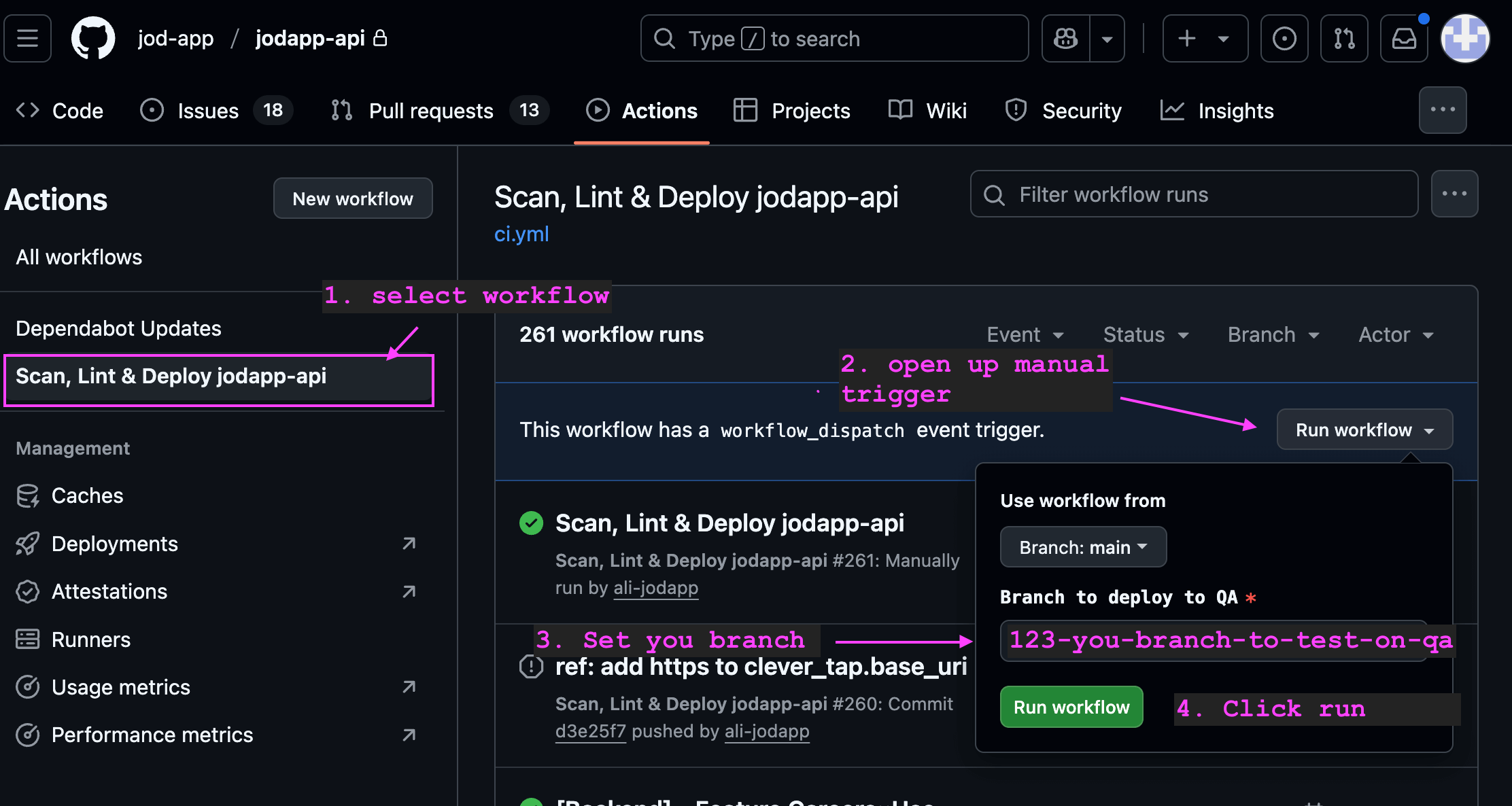
Github Workflow File
name: Scan, Lint & Deploy jodapp-api

on:
  workflow_dispatch:
    inputs:
      branch:
        description: 'Which branch to deploy?'
        type: string
        required: true
        default: 'main'
      job_to_run:
        description: 'Which job to run?'
        type: choice
        required: true
        default: 'deploy_qa'
        options:
          - deploy_qa
          - deploy_production

jobs:
  scan_and_lint:
    if: ${{ github.event_name == 'workflow_dispatch' }}
    runs-on: ubuntu-24.04
    permissions:
      contents: read
      security-events: write  # For uploading scan results
    steps:
      - name: Checkout code
        uses: actions/checkout@v4
        with:
          ref: ${{ github.event.inputs.branch }}

      - name: Set up Ruby
        uses: ruby/setup-ruby@v1
        with:
          ruby-version: .ruby-version
          bundler-cache: true

      - name: Scan for common Rails security vulnerabilities
        run: bin/brakeman --no-pager;

      - name: Lint code for consistent style
        run: bin/rubocop -f github

  # Job 2: Run tests
  # test:
  #   needs: [build]
  #   runs-on: ubuntu-latest
  #   services:
  #     postgres:
  #       image: postgres:15
  #       env:
  #         POSTGRES_USER: postgres
  #         POSTGRES_PASSWORD: postgres
  #       ports:
  #         - 5432:5432
  #       options: --health-cmd="pg_isready" --health-interval=10s --health-timeout=5s --health-retries=3
  #   steps:
  #     - name: Checkout code
  #       uses: actions/checkout@v4

  #     - name: Set up Ruby
  #       uses: ruby/setup-ruby@v1
  #       with:
  #         ruby-version: .ruby-version
  #         bundler-cache: true

  #     - name: Run tests
  #       env:
  #         RAILS_ENV: test
  #         DATABASE_URL: postgres://postgres:postgres@localhost:5432/jodapp_api_test
  #       run: |
  #         bin/rails db:prepare
  #         bin/rails test

  # Job 3: Deploy to QA Environment (Manual Trigger)
  deploy_qa:
    needs: [scan_and_lint]
    if: ${{ github.event_name == 'workflow_dispatch' && github.event.inputs.job_to_run == 'deploy_qa' }}
    runs-on:
      group: jodapp-qa
    environment:
      name: qa
      url: ${{ vars.APP_URL || '' }}
    permissions:
      contents: read
      packages: write
    timeout-minutes: 10

    steps:
      - name: Checkout Code
        uses: actions/checkout@v4
        with:
          ref: ${{ github.event.inputs.branch }}

      # Ruby and kamal already setup in deploy servers
      # Uncomment if deploy servers do not have them installed
      # - name: Set up Ruby
      #   uses: ruby/setup-ruby@v1
      #   with:
      #     ruby-version: .ruby-version
      # - name: Install Kamal CLI
      #   run: gem install kamal

      # - name: Setup Kamal
      #   run: kamal setup --config-file=config/deploy.yml --destination=qa
      #   env:
      #     DOCKER_IMAGE: ${{ vars.DOCKER_IMAGE }}
      #     GITHUB_ACTOR: ${{ github.actor }}
      #     GITHUB_TOKEN: ${{ secrets.GITHUB_TOKEN }}
      #     BASTION_HOST: ${{ secrets.BASTION_HOST }}
      #     KAMAL_SSH_KEY: ${{ secrets.KAMAL_SSH_KEY }}
      #     RAILS_MASTER_KEY: ${{ secrets.RAILS_MASTER_KEY }}
      #     JODAPP_QA_API_PRIVATE_IP: ${{ vars.JODAPP_QA_API_PRIVATE_IP }}

      - name: Deploy QA - Rails Api + Sidekiq
        run: kamal deploy --primary --config-file=config/deploy.yml --destination=qa
        env:
          DOCKER_IMAGE: ${{ vars.DOCKER_IMAGE }}
          GITHUB_ACTOR: ${{ github.actor }}
          GITHUB_TOKEN: ${{ secrets.GITHUB_TOKEN }}
          BASTION_HOST: ${{ secrets.BASTION_HOST }}
          KAMAL_SSH_KEY: ${{ secrets.KAMAL_SSH_KEY }}
          RAILS_MASTER_KEY: ${{ secrets.RAILS_MASTER_KEY }}
          JODAPP_QA_API_PRIVATE_IP: ${{ vars.JODAPP_QA_API_PRIVATE_IP }}

      - name: Deploy QA - kamal config
        run: kamal config --primary --config-file=config/deploy.yml --destination=qa
        env:
          DOCKER_IMAGE: ${{ vars.DOCKER_IMAGE }}
          GITHUB_ACTOR: ${{ github.actor }}
          GITHUB_TOKEN: ${{ secrets.GITHUB_TOKEN }}
          BASTION_HOST: ${{ secrets.BASTION_HOST }}
          KAMAL_SSH_KEY: ${{ secrets.KAMAL_SSH_KEY }}
          RAILS_MASTER_KEY: ${{ secrets.RAILS_MASTER_KEY }}
          JODAPP_QA_API_PRIVATE_IP: ${{ vars.JODAPP_QA_API_PRIVATE_IP }}

      - name: Deploy QA - kamal details
        run: kamal details --primary --config-file=config/deploy.yml --destination=qa
        env:
          DOCKER_IMAGE: ${{ vars.DOCKER_IMAGE }}
          GITHUB_ACTOR: ${{ github.actor }}
          GITHUB_TOKEN: ${{ secrets.GITHUB_TOKEN }}
          BASTION_HOST: ${{ secrets.BASTION_HOST }}
          KAMAL_SSH_KEY: ${{ secrets.KAMAL_SSH_KEY }}
          RAILS_MASTER_KEY: ${{ secrets.RAILS_MASTER_KEY }}
          JODAPP_QA_API_PRIVATE_IP: ${{ vars.JODAPP_QA_API_PRIVATE_IP }}

  # Job 4: Deploy to Production Environment (Push to main)
  deploy_production:
    needs: [scan_and_lint]
    if: ${{ github.event_name == 'workflow_dispatch' && github.event.inputs.job_to_run == 'deploy_production' }}
    runs-on:
      group: jodapp-prod
    environment:
      name: production
      url: ${{ vars.APP_URL || '' }}
    permissions:
      contents: read
      packages: write
    timeout-minutes: 10

    steps:
      - name: Checkout Code
        uses: actions/checkout@v4
        with:
          ref: ${{ github.event.inputs.branch }}

      # Ruby and kamal already setup in deploy servers
      # Uncomment if deploy servers do not have them installed
      # - name: Set up Ruby
      #   uses: ruby/setup-ruby@v1
      #   with:
      #     ruby-version: .ruby-version
      # - name: Install Kamal CLI
      #   run: gem install kamal

      # - name: Setup Kamal
      #   run: kamal setup --config-file=config/deploy.yml
      #   env:
      #     DOCKER_IMAGE: ${{ vars.DOCKER_IMAGE }}
      #     GITHUB_ACTOR: ${{ github.actor }}
      #     GITHUB_TOKEN: ${{ secrets.GITHUB_TOKEN }}
      #     BASTION_HOST: ${{ secrets.BASTION_HOST }}
      #     KAMAL_SSH_KEY: ${{ secrets.KAMAL_SSH_KEY }}
      #     RAILS_MASTER_KEY: ${{ secrets.RAILS_MASTER_KEY }}
      #     JODAPP_PROD_API_PRIVATE_IP: ${{ vars.JODAPP_PROD_API_PRIVATE_IP }}

      - name: Deploy Production - Rails API + Sidekiq
        run: kamal deploy --primary --config-file=config/deploy.yml
        env:
          DOCKER_IMAGE: ${{ vars.DOCKER_IMAGE }}
          GITHUB_ACTOR: ${{ github.actor }}
          GITHUB_TOKEN: ${{ secrets.GITHUB_TOKEN }}
          BASTION_HOST: ${{ secrets.BASTION_HOST }}
          KAMAL_SSH_KEY: ${{ secrets.KAMAL_SSH_KEY }}
          RAILS_MASTER_KEY: ${{ secrets.RAILS_MASTER_KEY }}
          JODAPP_PROD_API_PRIVATE_IP: ${{ vars.JODAPP_PROD_API_PRIVATE_IP }}

      - name: Deploy Production - kamal config
        run: kamal config --primary --config-file=config/deploy.yml
        env:
          DOCKER_IMAGE: ${{ vars.DOCKER_IMAGE }}
          GITHUB_ACTOR: ${{ github.actor }}
          GITHUB_TOKEN: ${{ secrets.GITHUB_TOKEN }}
          BASTION_HOST: ${{ secrets.BASTION_HOST }}
          KAMAL_SSH_KEY: ${{ secrets.KAMAL_SSH_KEY }}
          RAILS_MASTER_KEY: ${{ secrets.RAILS_MASTER_KEY }}
          JODAPP_PROD_API_PRIVATE_IP: ${{ vars.JODAPP_PROD_API_PRIVATE_IP }}

      - name: Deploy Production - kamal details
        run: kamal details --primary --config-file=config/deploy.yml
        env:
          DOCKER_IMAGE: ${{ vars.DOCKER_IMAGE }}
          GITHUB_ACTOR: ${{ github.actor }}
          GITHUB_TOKEN: ${{ secrets.GITHUB_TOKEN }}
          BASTION_HOST: ${{ secrets.BASTION_HOST }}
          KAMAL_SSH_KEY: ${{ secrets.KAMAL_SSH_KEY }}
          RAILS_MASTER_KEY: ${{ secrets.RAILS_MASTER_KEY }}
          JODAPP_PROD_API_PRIVATE_IP: ${{ vars.JODAPP_PROD_API_PRIVATE_IP }}
How to Deploy
Both environments deploy the same way. Production is not automatic.
- Open the Actions tab of the
jodapp-apirepository. - In the left sidebar, click Scan, Lint & Deploy jodapp-api.
- Click Run workflow.
- Enter the branch. For production this must be
main. - Choose
deploy_qaordeploy_production. - Click the green Run workflow button.
The run page shows the two jobs. The deploy job's log ends with First web container is healthy and, for sidekiq, Container is healthy! when everything worked.
How Long a Deploy Takes
Measured in September 2026, after the changes in jodapp-api#2033 and jodapp-web#1413. "Whole workflow" includes the scan and lint job.
| What changed since the last deploy on this runner | jodapp-api | jodapp-web |
|---|---|---|
Nothing the image uses (for example only docs/ or .claude/) | about 1m 30s | about 1m 30s |
| Normal code change | about 2m 30s | about 2m 30s |
Gemfile.lock or package-lock.json changed | about 4m 30s | about 4m |
A Dockerfile change above the install step, or a change to the layer order | 5m to 9m, once per runner | 3m 30s, once per runner |
Why the numbers differ:
- Docker builds the image as a stack of layers, one per
RUNorCOPYline. BuildKit reuses a layer when its inputs did not change. The deploy runner keeps those layers on disk, so a normal deploy only rebuilds the layers afterCOPY . .. - A lockfile change makes
bundle install(about 2 minutes, 56 gems with native extensions) ornpm ci(about 30 seconds) run again. - A change to a
RUNline above the install step, or to the order of the final stage, changes the cache key of everything after it. The install runs again, and the server has to download the whole image once instead of only the app layer. The next deploy is normal again. - Each runner has its own cache. The first production deploy after such a change pays the same one-time cost as the first QA deploy.
Things that made deploys slow before, so nobody adds them back:
- A
RUN chown -RafterCOPY. A file in a lower layer cannot change owner in place, sochowncopies every file it touches into a new layer. For the API that duplicateddb/and the bootsnap cache (28 seconds); for the web app the wholenode_modules(88 seconds). UseCOPY --chowninstead. - An
ENVorARGthat changes on every deploy, placed above the install step. Injodapp-web,VITE_COMMIT_SHAabovenpm cimadenpm cirun on every deploy. Declare such values right before the step that needs them. - Folders the app never reads inside the build context. They make the image bigger and any change to them forces a rebuild. Keep them in
.dockerignore. kamal setupon every deploy. It is a one-time server bootstrap that ends with a deploy, so running it beforekamal deploydeployed the same image twice.
Reading the timings from a run
Kamal prints BuildKit's output in chunks, so the timestamps in the GitHub log are misleading. Use the numbers BuildKit and Kamal print themselves:
gh run view --repo jod-app/jodapp-api --job <job id> --log \
  | grep -E '#[0-9]+ (DONE|CACHED)|Finished in|container is healthy|Finished all'
#12 DONE 58.2sor#12 CACHED: oneDockerfilestep.CACHEDmeans the layer was reused.Finished in 58.175 secondsafterRunning docker buildx build: the whole image build.Finished in 8.831 secondsafterRunning docker pull: the download on the API server.First web container is healthy: the app is up and serving.Finished all in 91.9 seconds: Kamal's total.
jodapp-web Differences
The Board Web app deploys the same way. What is different:
- Kamal config lives in
deploy/deploy.ymlanddeploy/deploy.qa.yml, and the workflow inputs include theVITE_*build arguments. - The workflow has a
bootstrap_serverinput, defaultno. Set it toyesonly for the first deploy to a brand-new server; it runskamal setupbefore the deploy. - The app listens on port 5173 inside the container (
react-router-serve), soproxy.app_portis5173.
Rails Configurations
It's important to update config.hosts in production.rb and qa.rb
Since docker network will be receiving requests from haproxy, and then forwarding it to the rails docker container, we will need to tell rails to allow the request.
  # Enable DNS rebinding protection and other `Host` header attacks.
  # In our AWS setup: Internet → HAProxy (public) → Rails (private)
  config.hosts = [
    # External domains (preserved by HAProxy)
    'jodapp.com',
    /.*\.jodapp\.com/,

    # HAProxy health checks and internal requests
    /^[a-f0-9]{12}:3000$/,  # Docker container hostnames (12-char hex)
    /^10\./,                # AWS VPC private network (10.x.x.x)
    '127.0.0.1:3000',       # Localhost for container health checks
    'localhost:3000'        # Local health checks
  ]