Credits Information Improvement
Purpose
This change makes credit information easier to understand.
It changes three parts of the portal:
- The Assigned Credits page.
- The job creation page.
- The dashboard.
It also improves insufficient-credit messages.
This change does not change credit deductions or validation rules.
TL;DR
- Rename the Assigned Credits page to Credits Page.
- Show HQ users the company balance, reserved credits, negative floor, and positive Credits Left to Spend.
- Show a red warning when a location has negative usable credits.
- Show job credit estimates before the user creates a job.
- Keep the credit-usage chart. Add a new Credit Overview for each user role.
- Replace technical insufficient-credit errors with short messages that explain the problem and next step.
Vocabulary
| Term | Meaning |
|---|---|
| Available Credits | The current company credit balance. |
| Reserved Credits | Credits kept for open and active jobs. The system will deduct them when a job completes. |
| Usable Credits | Credits available after the system removes reserved credits. |
| Consumed Credits | The total credits used by the location or company during the current month. |
| Credits Left to Spend | The positive amount that the company can still spend before it reaches its negative credit floor. |
| Negative Credit Floor Limit | The lowest total credit position JOD allows for a company. It is a company-level limit. |
| HQ user | A user who can view company credit information and assign credits to locations. |
| Area user | A user who manages more than one assigned location. |
| Location user | A user who manages one assigned location. |
Credit Rules
| Rule | Result |
|---|---|
| A company has a negative credit floor. | The floor applies to the whole company. It does not apply separately to each location. |
| A location has negative usable credits. | The location can still spend if the company remains above its negative credit floor. |
| A company usable-credit value is negative. | The UI shows Credits Left to Spend. It does not show a negative company usable-credit value. |
| A location usable-credit value is negative. | The UI shows the negative value in red. This helps users find the location that needs credits. |
| A company reaches its negative credit floor. | The company has 0 Credits Left to Spend. New credit-consuming actions cannot continue. |
Calculations
company_usable_credits = available_credits - reserved_company_credits
credits_left_to_spend = max(0, company_usable_credits - negative_credit_floor_limit)
Example:
| Value | Credits |
|---|---|
| Company Usable Credits | -500 |
| Negative Credit Floor Limit | -1,000 |
| Credits Left to Spend | 500 |
The company can spend 500 more credits. After that, it reaches -1,000.
The server remains the source of truth for every credit-consuming action. The frontend must not allow its display calculation to replace server validation.
Credits Page

Rename the Assigned Credits Page to Credits Page.
HQ Summary
The Credits Page shows this summary to HQ users.
| Item | Meaning |
|---|---|
| Available Credits | The company credit balance. |
| Credits Left to Spend | The positive spending room before the company reaches its negative credit floor. |
| Reserved Company Credits | Credits reserved for the company’s open and active jobs. |
| Negative Credit Floor Limit | The lowest total credit position the company may reach. |
| Consumed Credits | Total credits used during the current month. |
The page must not show a company-level negative Usable Credits value.
It must use the label Credits Left to Spend instead.
Location Credits Table
All users see the location credits table.
| Column | Content |
|---|---|
| Location Name | The location name. It also shows a negative-credit alert when needed. |
| Usable Credits | The location’s usable credits. |
| Reserved Credits | Credits reserved for this location’s open and active jobs. |
| Consumed Credits | Credits already consumed by the location. |
| Function | An Assign button for HQ users. It opens the location credit detail page. That page keeps the Assign Credits button. |
The Assign button follows existing access rules. Non-HQ users must not receive a new assignment action.
Negative Location Credits

| Condition | Location Name cell | Usable Credits cell |
|---|---|---|
Usable Credits is 0 or more | Show the location name only. | Use the normal text colour. |
Usable Credits is below 0 and viewer is HQ | Show: Please assign credits to this location. Then show the remaining company spending room. | Show the value in red. |
Usable Credits is below 0 and viewer is an Area or Location user | Show: Please ask your HQ to assign credits to this location. | Show the value in red. |
For HQ users, the alert must use this text pattern:
Please assign credits to this location. You have
<credits_left_to_spend>credits left to spend before the company reaches its limit.
The alert uses the company-level Credits Left to Spend value. It does not calculate a floor for the location.
Job Creation Page
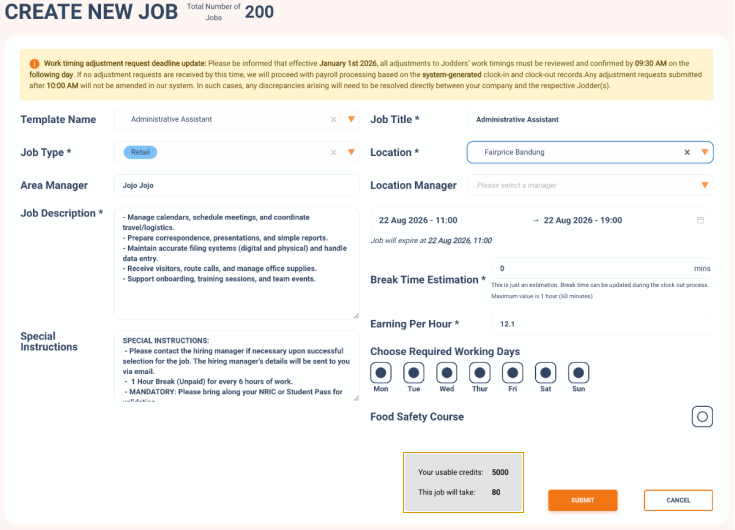
Show a credit estimate after the user enters either of these fields:
- Earning Per Hour.
- Break time estimation.
The estimate updates again whenever either input changes.
| UI item | Content |
|---|---|
| Job credit requirement | The estimated credits required for this job. |
| Usable Credits | The usable credits for the pool that will pay for this job. |
| Condition | Display |
|---|---|
| Estimated job credit requirement is less than or equal to usable credits | Use the normal text colour.  |
| Estimated job credit requirement is greater than usable credits | Show the job credit requirement in red.  |
| The user has not entered either required input | Do not show a credit estimate. |
The estimate helps users before they submit the job. The server still decides whether the job can be created. Reserved credits or another recent action may change the final result.
Dashboard
Keep the existing monthly chart widget. Add a new widget beside it.
Existing Widget
Rename Credit Overview to Credit Usage Overview.
| Keep or remove | Item |
|---|---|
| Keep | The monthly credit-usage chart. |
| Keep | Consumed Credits for the current month. |
| Keep | The Assign Credits button where the user has permission. |
| Remove | HQ Available JOD Credits. |
| Remove | Location JOD Credits. |
New Credit Overview Widget

Create a new widget named Credit Overview.
| Viewer | Content |
|---|---|
| HQ user | Company summary and a list of all company locations. |
| Area user | A list of the locations assigned to that Area user. |
| Location user | A list with that user’s one assigned location. |
HQ Content
The HQ summary shows:
| Item | Level |
|---|---|
| Available Credits | Company |
| Credits Left to Spend | Company |
| Total Reserved Location Credit | All company locations |
| Total Usable Location Credit | All company locations |
| Negative Credit Floor Limit | Company |
The HQ location list shows:
| Item | Level |
|---|---|
| Location Name | Each company location |
| Usable Credits | Each company location |
| Est. Days before next top up | Each company location |
Area and Location Content
The non-HQ widget uses a list-group view.
| Viewer | Number of locations | Item shown for each location |
|---|---|---|
| Area user | Every assigned location | Location Name, Usable Credits, Reserved Credits, Est. Days before next top up |
| Location user | One assigned location | Location Name, Usable Credits, Reserved Credits, Est. Days before next top up |
Insufficient-Credit Messages
The current error messages show an equation before they explain the problem. This is hard to understand during job creation.
Every message must first state:
- What action cannot continue.
- Which credit pool does not have enough credits.
- How many credits the action needs.
- How many credits the user can use now.
- What the user should do next.
Use the values in the message only after the server calculates them.
| Error key | When it happens | Clear message pattern |
|---|---|---|
company_credits_not_enough | A new job uses the company pool. | This job needs <required_credits> credits. Your company can use <usable_credits> credits now. <reserved_credits> credits are reserved for open and active jobs. Please ask your Finance team to add credits. |
location_credits_not_enough | A new job uses the location pool. | This job needs <required_credits> credits. <location_name> can use <usable_credits> credits now. <reserved_credits> credits are reserved for open and active jobs. Please ask your HQ to assign credits to this location, or ask your Finance team to add credits. |
selecting_company_credits_not_enough | Selecting applicants uses the company pool. | Selecting these applicants needs <required_credits> credits. Your company can use <usable_credits> credits now. <reserved_credits> credits are reserved for active jobs. Please ask your Finance team to add credits. |
selecting_location_credits_not_enough | Selecting applicants uses the location pool. | Selecting these applicants needs <required_credits> credits. <location_name> can use <usable_credits> credits now. <reserved_credits> credits are reserved for active jobs. Please ask your HQ to assign credits to this location, or ask your Finance team to add credits. |
Do not show a raw calculation such as
available_credits - reserved_credits = usable_credits in the first message.
The UI may show these values in a details section if users need them.
Worked Example
- Rina creates a job for Jakarta Store.
- The job needs
600credits. - Jakarta Store has
1,000credits available. - The system reserves
700credits for its open and active jobs. - Jakarta Store can use
300credits now. - The system blocks the job because
600is greater than300. - The portal shows:
This job needs 600 credits. Jakarta Store can use 300 credits now. 700 credits are reserved for open and active jobs. Please ask your HQ to assign credits to this location, or ask your Finance team to add credits.
Data Needed by the Frontend
The frontend needs current values from the same credit calculation that the server validates.
| Value | Used by |
|---|---|
| Company Available Credits | HQ Credits Page and HQ Credit Overview. |
| Company Reserved Credits | HQ Credits Page and Credits Left to Spend calculation. |
| Company Negative Credit Floor Limit | HQ Credits Page and Credits Left to Spend calculation. |
| Company Credits Left to Spend | HQ Credits Page, HQ Credit Overview, and HQ negative-location alerts. The backend may return it, or the frontend may calculate it from the company values. |
| Per-location Usable Credits | Credits Page, job creation, and every Credit Overview location list. |
| Per-location Reserved Credits | Credits Page and the Area and Location user dashboard lists. |
| Per-location Consumed Credits | Credits Page. |
| Estimated job credit requirement | Job creation page. |
Acceptance Checks
| Scenario | Expected result |
|---|---|
| HQ opens the renamed Credits Page. | The page shows Available Credits, Credits Left to Spend, Reserved Company Credits, and Negative Credit Floor Limit. |
A location has -500 usable credits. The company floor is -1,000. | HQ sees the red -500 value and an alert that says 500 credits remain before the company reaches its limit. |
| The same location is viewed by an Area or Location user. | The user sees the red -500 value and an alert asking them to contact HQ. |
| A job needs more credits than the selected pool can use. | The job estimate appears in red before submission. Server validation still runs on submission. |
| HQ opens the dashboard. | The existing widget is named Credit Usage Overview. The new Credit Overview shows the HQ summary and all locations. |
| An Area user opens the dashboard. | The new Credit Overview lists only assigned locations with usable and reserved credits. |
| A Location user opens the dashboard. | The new Credit Overview lists the one assigned location with usable and reserved credits. |